|
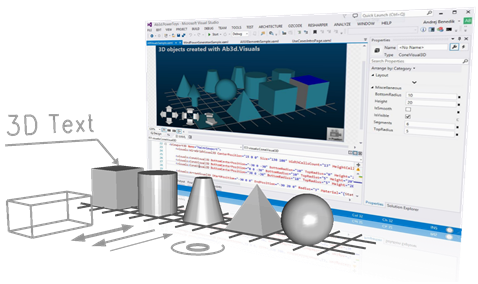
Ab3d.PowerToys is the ultimate helper library for work with WPF 3D.
The main features of the library are:
- Cameras (SceneCamera, FirstPersonCamera, ThirdPersonCamera, etc.)
- Camera Controllers (MouseCameraController, CameraControlPanel)
- 3D Models and Visuals (Sphere, Box, Cylinder, etc.)
- 3D Lines
- 3D Text
- Event Manager 3D (simplified event handling on 3D objects)
- Complete solution for WPF 3D transparency problem
- Many helper classes to ease work with WPF 3D
Cameras, 3D Models, Lines and Text can be defined in XAML. The
results are immediately shown in Visual Studio Designer so the
whole 3D scene can be designed in Visual Studio almost as in a 3D modeling application.
With Ab3d.PowerToys programming with 3D cannot be easier!
Cameras and Camera Controllers
The library defines a few new Cameras that can be used instead of the current WPF's
cameras. The main difference between Ab3d Cameras and WPF cameras is that Ab3d Cameras
does not use Vectors to define the LookDirection, but instead use angles in degrees
to define it. This is much more natural. For example if you want to look at the
scene a little bit from the right and from above, you just define the Heading to
be 30 and Attitude to be -45. You can also define the Distance from the scene. The
most important Ab3d Cameras are: SceneCamera, FirstPersonCamera and ThirdPersonCamera.
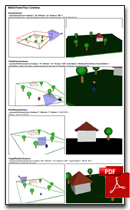
A good overview of the new cameras can be seen in the Cameras cheat sheet
document that can be opened from a link below.
Camera Controllers are used to control the camera. The MouseCameraController
can be used to rotate and move the camera with the mouse. The rotation and movement
can be configured to any combination of mouse buttons and keyboard modifiers (shift,
control and alt). For example the following XAML sets the MouseCameraController
to rotate the camera with left mouse button and to move the camera with left mouse
button and alt key pressed:
<ab3dControls:MouseCameraController
RotateCameraConditions="LeftMouseButtonPressed"
MoveCameraConditions="LeftMouseButtonPressed, AltKey"/>
The CameraControlPanel shows nice buttons to rotate and move the
camera and also move the camera closer or farther away. There are also a CameraPreviewPanel
and CameraAxisPanel that graphically show the current orientation
of the camera.
3D Models
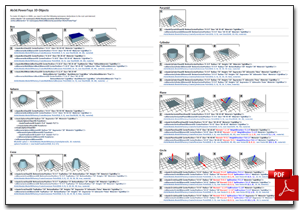
The Ab3d.PowerToys library also contains classes to create basic 3D models in code
or XAML. It is possible to create Plane, Circle, Box, Pyramid, Sphere, Cone
and Cylinder 3D models.
To make the 3D objects definitions cleaner a ModelTypeConverter is used for all
Material properties used by 3D objects. This way it is possible to set the material
with a color name or code (#FFFFAAAA) or image uri.
3D Lines
There is also support for 3D Lines with optimized update mechanism
that makes the 3D lines implementation the most advanced and with the best performance
for WPF.
3D Text
The library also supports 3D Text that can be defined anywhere
in 3D space. The text is drawn as a series of connected 3D lines that are created
from internal font definition.
EventManager3D
The EventManager3D class is a helper class that enables user to
simply subscribe to mouse events on 3D objects. The following mouse events are supported:
MouseEnter, MouseLeave, MouseDown, MouseUp, MouseClick, BeginMouseDrag, MouseDrag,
EndMouseDrag and MouseDoubleClick. This way you do not need to do the
complicated 3D hit testing any more. The EventManager3D is also better than WPF's
ModelUIElement3D because it supports more mouse events (including mouse drag in
3D), provides better event data and preserves the structure of the 3D models. This
way your code is much simpler and better organized.
Transparency sorting
WPF 3D can show transparent 3D objects. But to show them correctly, the transparent
objects need to be correctly sorted. Without this some of the objects are not visible
through the transparent objects. Ab3d.PowerToys provide complete solution to this
problem. More about that can be read in
Transparency Sorting page.
Beginner's guide
To get some additional information about using Ab3d.PowerToys and see how easy is to create great business applications with 3D graphics see the following blog post.
Important:
The Ab3d.PowerToys library is available as a stand alone product.
It is also available only for 1 USD with
Ab3d.Reader3ds Pro license. This way you get a complete set of
tools for WPF 3D.
Ab3d.PowerToys cheat sheets:

|
|

|
|
3D Objects
|
|
Cameras
|
Screenshots with XAML source:
Other screenshots:
Versions history
Version 3.4
- Added GetCameraPosition method to BaseCamera.
- Fixed creating geometry for Visual 3D objects when no property is changed on the visual (for example if default size is used).
- Fixed showing long 3d lines that cross the near camera plane (before such lines were not correctly shown).
- Improved measuring size of CameraControlPanel - now it is possible to define only desired Width or Height and the control automatically sets the other (Height or Width).
- In MouseCameraController the StartMouseProcessing and EndMouseProcessing are now protected virtual and can be overriden (before they were private).
- Improved creation of sphere mesh - before some triangles were defined in such a way that they represented a line instead of triangle (two positions in the triangle were defined in the same position in space).
- Added possibility to create a slightly improved sphere mesh when there is no need to create texture coordinates (this can be done with spefiying generateTextureCoordinates as false in the Ab3d.Meshes.SphereMesh3D constructor).
- Added DumpMatrix3D to Dumper.
- Improved FpsMeter when custom DisplayFormatString is set.
- Fixed creating PolyLines when it is created with duplicate positions - Index out of range exception was thrown before.
Version 3.3
- Improved support for Visual Studio 2012 designer - now cameras correctly discover Viewport3D control when TargetViewport3D is not manually set.
- Fixed a typo with renaming WireBoxVisual3 into WireBoxVisual3D (BREAKING CHANGE!).
- Improved 3D Text - now ? character is correctly displayed instead of a character that does not have its 3D shape defined.
- Fixed problem with displaying 3D Text in Visual Studio designer.
Version 3.2
- Added HeightMapVisual3D and HeightMapMesh3D.
- Added TubeMesh3D, TubeVisual3D and TubeUIElement3D.
- Added support to very easily create 3D curves: added Ab3d.Utilities.BezierCurve and Ab3d.Utilities.BSpline classes; also added CreateBSpline3D and CreateNURBSCurve3D to Line3DFactory.
- Improved LinesUpdater performance and removed possible memory leaks.
- Added Reset method to LinesUpdater that takes Viewport3D as parameter to reset (remove all lines) from specific Viewport3D.
- Added MouseWheel event to EventManager3D.
Version 3.1
- Fixed rotating with MouseCameraController and CameaControlPanel when the scene in vertically inverted when Attitude is between 90 and 270 degrees.
- Fixed EventManager3D where under some circumstances a new object drag can be automatically stared just after end drag event.
- Improved MaterialTypeConverter: Added support for simply defining SpecularMaterial and EmissiveMaterials. For example the "s:32;Blue" text can be used to define MaterialGroup with DiffuseMaterial and SpecularMaterial (SpecularPower = 32; SpecularBrush = White; DiffuseMaterial = Blue). The "e:Yellow" can be used to show yellow emissive material. Also improved support for defining textures path (now files from local disk and from http can be used).
- Fixed occasional NullReferenceException in SphericalCamera when layout is updated in Visual Studio designer.
Version 3.0
- Added support for transparency sorting with new TransparencySorter
and TransparencyHelper classes.
- Simplified animating camera rotation with new StartRotation, StopRotation
methods on SphericalCamera. There is also a new IsRotating properties. The MouseCameraController
is also adjusted to suspend animated rotation while user rotates the camera with
the mouse.
- Added axes names to CameraAxisPanel. Also added IsAxisNameShown,
XAxisColor, YAxisColor and ZAxisColor properties to CameraAxisPanel.
- Added support for OrthographicCamera for all Ab3d.PowerToys Cameras.
Added CameraType and CameraWidth properties to BaseCamera.
- Greatly improved creating wireframe from existing 3D models - now
it is much faster and uses much less memory.
- Improved LinesUpdater - the lines that are removed from the visual tree are now
free to be cleaned by garbage collection.
- Added Reset and UnregisterLine methods to LinesUpdater to manually remove lines
from LinesUpdater. This enables better manual control of the registered lines.
- Improved measuring scene bounds in SceneCamera when transformations are used on
Visual3D objects. Before the used transformations prevented the camera to correctly
show the scene.
- Fixed selecting cameras with mouse click on camera icon in Visual Studio 2010 designer.
- Added GetCameraMatrixes to BaseCamera to get view and projection Matrix3D of the
current camera.
- Improved Ab3d.Utilities.Dumper class - Added GetTransformText and GetMatrix3DText
methods and made GetMaterialText public. Also the GetModelInfoString method now
also displays the Transformation details.
- Improved commercial licensing code to prevent delay caused in RSACryptoServiceProvider
under some circumstances.
- Added Ab3d.Licensing.PowerToys.EmbeddedLicenseAssembly property to speed-up looking
for embedded license key in commercial version.
Version 2.1
- Fixed licensing code for WPF Browser applications (partially trusted) - before licensing
did not work when both Ab3d.Reader3ds and Ab3d.PowerToys were used (defined in license.licx
file).
Version 2.0
New features:
- Added Offset to all cameras to move the camera around.
- Added support for moving camera with MouseCameraController and CameraControlPanel.
- Added RotateCameraConditions and MoveCameraConditions properties to MouseCameraController
to fine tune the conditions to rotate and move the camera.
- Added 3D Text support with TextVisual3D, CenteredTextVisual3D and LineWithTextVisual3D.
- Added MultiMaterialBox where each side of the box can have its own material.
- Added CreateFrom method to all Ab3d.Cameras - it can be used to create any Ab3d.Camera
from existing WPF's Camera (or camera read from 3ds file with Ab3d.Reader3ds).
- Added CameraAxisPanel - a predefined panel that shows the axis orientation for the
target camera.
- Added RectangleVisual3D, WireBoxVisual3, WireCrossVisual3D, VerticalPlaneVisual3D
and LineArcVisual3D.
- Added IsVisible to all 3d models derived from Visual3D. Now all Visual3D are derived
from BaseVisual3D.
- Added CreateWireframe method that takes Model3D to create wireframe from Model3DGroup
or GeometryModel3D.
- Added IsClosed property to WireGridVisual3D - if true a rectangle is drawn around
wire grid to close the grid.
- Added possibility to set 3D line thickness to 0 to hide the line - the same as set
IsVisible to false.
- Added Refresh method to all UIElemet3D classes - this way it is possible to force
creation of used Model3D also if the UIElemet3D is not added to Viewport3D.
- Added EventsSourceElementName to MouseCameraController - now it is possible to specify
the custom event source also by specifying the element name.
- Added GetModelInfoString method to Ab3d.Utilities.Dumper class - it gets a string
with details about the GeometryModel3D or Model3DGroup.
- Added IsDesignTimeInfoIconShown property to Ab3d.Cameras to hide camera info icon
in design time - useful for custom controls that use Ab3d.Cameras.
- Added Ab3d.Utilities.CameraUtils with CalculateCameraAngles to get camera angles
(heading, attitude, bank) from lookDirection and upDirection.
- Added Ab3d.Utilities.MathUtils.Rotete method to rotate Vector3D or Point3D for heading
and attitude.
- Added Ab3d.Utilities.MathUtils with IsOne, IsZero and IsSame methods that take double
precision errors into account.
- Added Refresh method to all UIElemet3D classes - this way it is possible to force
creation of used Model3D also if the UIElemet3D is not added to Viewport3D.
- Improved the MaterialTypeConverter to support creating a DiffuseMaterial with ImageBrush
from image resource name - for example Material="/Resources/PowerToysTexture.png".
- Improved line arrows - improved displayed when camera is pointing almost in the
direction of the line.
- Improved 3D PolyLines - lines are now connected to each other.
Fixes:
- Fixed for using in PartiallyTrusted environment - using Hand cursor instead of custom
cursor.
- Automatically Disable / Enable the MouseCameraController and CameraControlPanel
if Traget Camera's IsEnabled property is changed.
- Fixed using StartLineCap and EndLineCap on PolyLines.
- Improved DoubleClick event in EventManager3D - now the DoubleClick event does not
trigger the Click event on the second click (if the DoubleClick event is subscribed).
- Fixed normalizing normals in MeshUtils.CalculateNormals method.
- Fixed using TargetViewport3DName property on Cameras in Visual Studio Design Time
- in Design Time there is no NameScope so the FindName method does not work. To
fix this the code looks for Viewport3D manually by checking the Camera's Parents
Children. This means that the Camera must be defined under the same parent as the
Viewport3D in order that the TargetViewport3DName works in Design Time.
- Fixed using StartLineCap and EndLineCap on PolyLines.
- BREAKING CHANGE: Fixed Bank - now the positive bank values rotate the camera in
the clockwise direction (before the direction was counter-clockwise). For example
bank angle 30 means that the Camera is rotated as a head would be bended to the
right.
History
To see the development history of Ab3d.PowerToys, check out the
related blog posts.
Information about changes:
Subscribe to newsletter - enter your email into Newsletter box on my Blog.
|