|
SmartScreen filter warning
Windows 8 and Internet explorer include a SmartScreen filter that prevents unknown and malicious programs from running.
The problem with the filter is that all programs are unknown until certain amount of users download the program and do not report that it is malicious - this makes all our programs false positive by default.
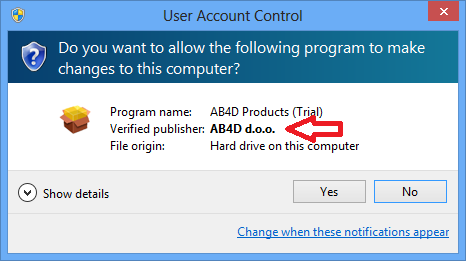
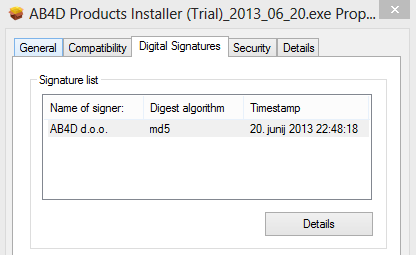
To prove that out installers are safe, we digitally sign each installer with correct authenticode digital signature (see last two screenshots below).
You can check that by right clicking on the installer and check the file properties.
Unfortunatelly this is not enought to prevent SmartScreen filter warning from showing.
Therefore if you get the warning, please do either:
- Download the zipped installer. Than unzip downloaded file and run the installer - looks like this workaround prevents the warning.
- Follow the instructions and screenshots below:
Incorrect message in IE (caused by a bug in IE) - click "View downloads" to go to downloads folder.
If any other browser is used, than the installer can be downloaded without any problems.

In Windows 8 SmartScreen filter is integrated into operating system, so if the following is shown please click "More info" to start the installer.
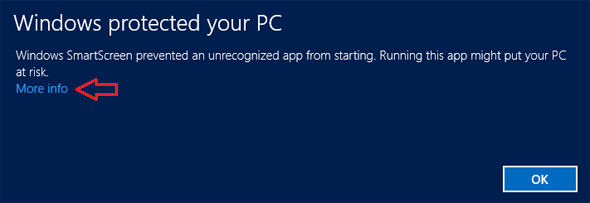
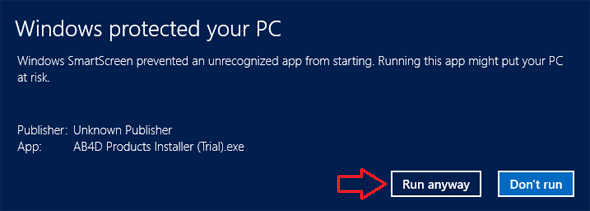
Than click "Run anyway" - despite valid digital signature Unknown Publisher might be shown:
After clicking "Run anyway" and if UAC is turned on the following dialog is shown (publisher is verified this time):
Before runnning installer you can also manually check the digital signature with right click on downloaded installer file
and selecting properties to check that the digital signature is valid.
Read more about problems with SmartScreen filter:
How to make my app pass SmartScreen filter in IE9 (or search web for many more sources)
|